 CMSDocumentation

Website administration
Content Security Policy
A Content Security Policy (CSP) is a list of the other websites your pages may load things from, such as fonts from Google, or videos from YouTube. Browsers block anything not on the list. It stops harmful code being slipped into your pages.
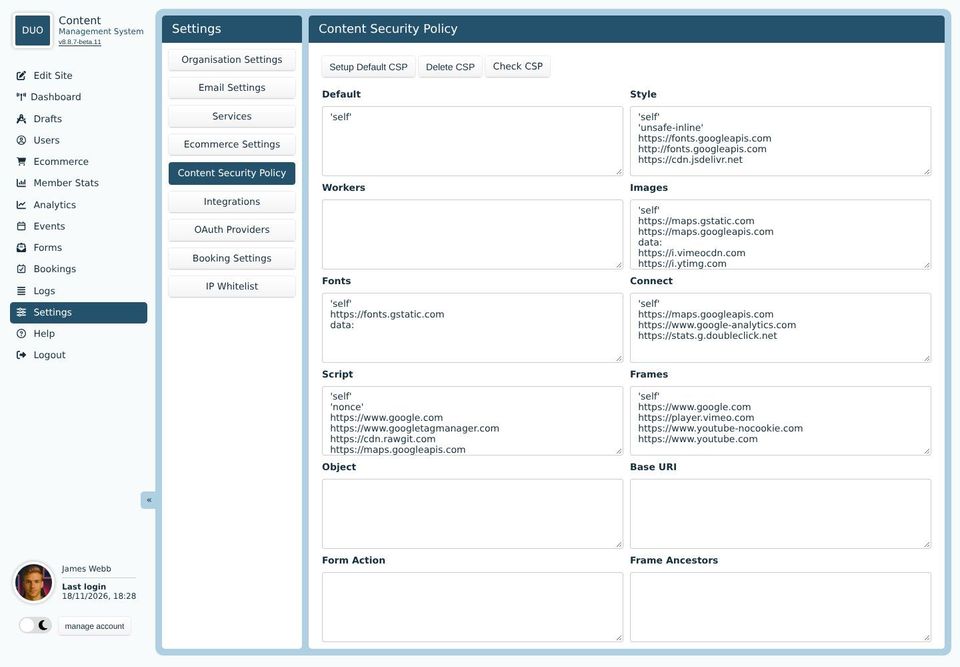
Each box is for one kind of thing, with one website address on each line:
Default: anything that doesn't have its own box.
Style and Fonts: stylesheets and fonts, such as Google Fonts.
Images: pictures from other websites, such as map tiles or video thumbnails.
Script: code from other websites, such as Google Analytics or reCAPTCHA.
Connect: other websites your pages fetch information from as they run.
Frames: other websites shown inside your pages, such as YouTube and Vimeo videos and Google Maps.
Workers, Object, Base URI, Form Action and Frame Ancestors: more technical settings, best left to your developer.
'self' means your own website. 'none' means nothing at all.
When something is blocked
If you add a video, map or other embed from a new website and it shows as blank, the policy is probably blocking it. Add the website's address to the matching box, usually Frames for an embed, then check the page again.
The buttons
Setup Default CSP fills the boxes with a standard policy that suits most websites. It replaces what's there.
Delete CSP empties every box, which turns the policy off.
Check CSP opens Mozilla's free website checker, which grades your website's security settings.
A mistake here can stop parts of your website working. If you're not sure, ask your developer.