 CMSDocumentation

Website administration
Integrations
Integrations connects your website to other services: Dropbox, your Google account, Google reCAPTCHA, and calendars kept elsewhere.
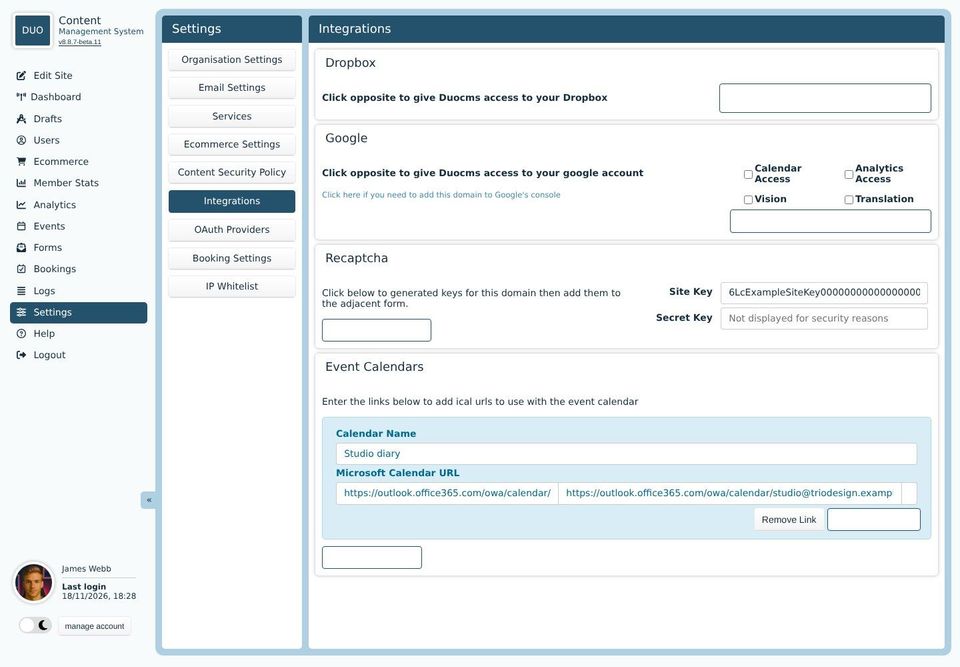
Dropbox
Authenticate with Dropbox lets your website use your Dropbox account, so you can bring files from it into your file library. You'll be asked to sign in to Dropbox and agree.
Tick what your website may use from your Google account, then click Authenticate with Google and sign in:
Calendar Access: shows a Google calendar's events on your website.
Analytics Access: shows your Google Analytics figures in the admin's Analytics screen.
Vision: has Google look at each picture you upload, so searching the file library finds pictures by what's in them.
Translation: translates text, for websites in more than one language.
Recaptcha
reCAPTCHA is Google's check that a form is being filled in by a person. If spam still gets through your forms, click Get Recaptcha Keys, register your website with Google, and copy the two keys it gives you into Site Key and Secret Key. Your developer then switches reCAPTCHA on.
Event Calendars
If you keep events in an Outlook calendar, your website can show them too. Click Add Event Calendar, give it a name, and paste in the calendar's published address (it ends in .ics). Test Calendar Link checks it works.
To find the address, publish the calendar in Outlook's calendar settings, under Shared calendars.